🔐
VPN Connection - Barracuda Network Access Client
VPN access allows a secure connection to your professional environment while teleworking or traveling. At Novanexys, we ensure your connection is reliable, secure, and easy to use.
📋 VPN Installation
If the VPN has not yet been installed on your computer:
👉 Contact Novanexys for installation.
To process your request, we need prior authorization from your supervisor.
🟢 Connecting to the VPN
Once the VPN is installed and configured:
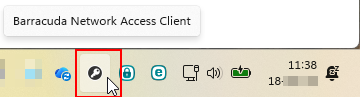
- Double-click the Barracuda Network Access Client icon in the notification area (next to the clock).
- Click on Connect.
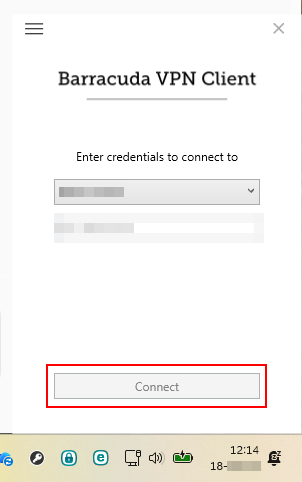
- Log in (Microsoft 365).
- Validate MFA if enabled (notification, code, or FIDO2 key).
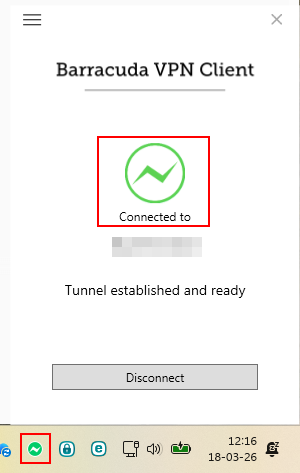
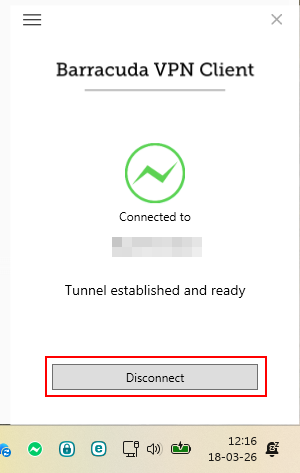
The icon turns green: the connection is active.
🔴 Disconnecting from the VPN
To exit the VPN:
- Double-click the Barracuda icon.
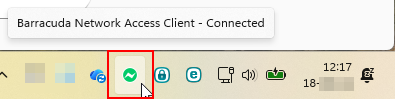
- Select Disconnect.
- Sélectionnez Disconnect.
🆘 Need Help?
Contact us:
☎️ +32 10 39 74 34
📧 support@novanexys.com